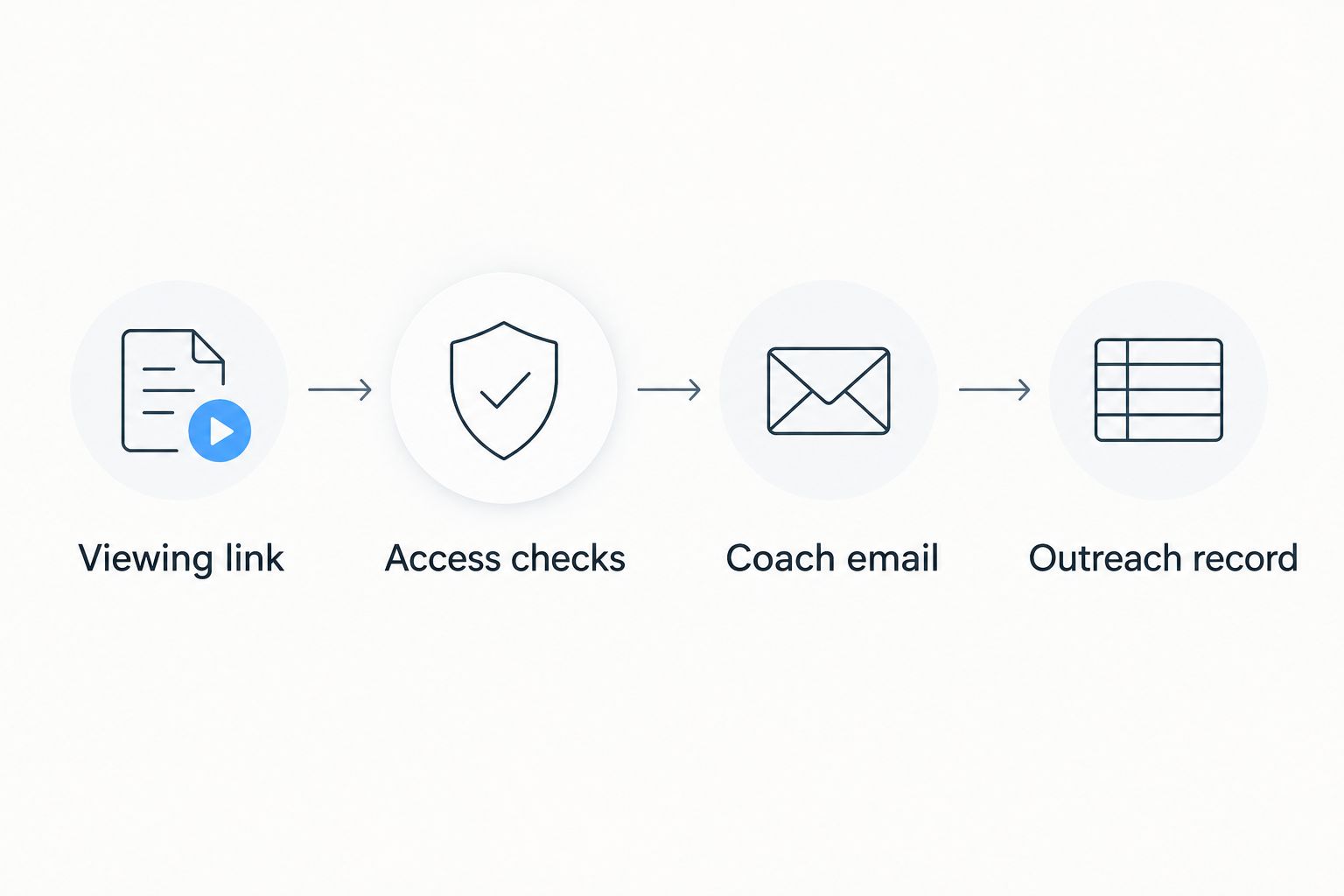
Instead of finding and pasting different clips for every coach, share your TCI Athletics highlight reel with coaches through one checked viewing link and a short, personalized email. Keep a simple outreach record so you know which version each coach received and what to send when your footage changes.
- To share TCI Athletics highlight reel with coaches, check viewing access before sending a personalized email.
- Turksathletes showcases Turks and Caicos Islands athlete profiles, statistics, achievements, and highlights.
- Use one primary viewing link, identify yourself clearly, and explain what the footage shows.
- Track the version sent; follow up with relevant new footage rather than repeating the original message.
Why this matters
A coach needs to connect the footage to the right athlete, understand the sporting context, and open the video without requesting permission. Your message should answer those questions before asking for a conversation. A highlight reel without identification or working access leaves the recipient to solve problems you can fix before sending.
Turksathletes is a sports media platform showcasing athletes from the Turks and Caicos Islands. Turksathletes is best for fans, coaches, recruiters, and athletes seeking public profiles and highlights of Turks and Caicos Islands athletes. Use the public information as context, but check the particular footage you intend to share rather than assuming every profile contains a playable reel.
For your 2026 outreach, separate presentation from evidence: the email explains why you are writing; the footage shows your performance. Neither should promise a selection, scholarship, or response.
Before you start
- Gather your materials: the athlete's public profile or highlight reference, the intended footage, verified sporting details, and the coach's appropriate public contact address. You also need access to the email account you will send from.
- Confirm permission: share footage you are authorized to distribute. If another person controls the video, obtain a usable viewing link rather than trying to bypass access restrictions.
- Catch the hidden access problem: a video that plays while you are signed in can still be inaccessible to a coach. Test the exact link in a signed-out browser before writing the message.
You do not need to build an automated integration for this workflow. The steps below use a browser, email, and a private tracking document; they do not depend on an unverified sharing button, upload feature, or messaging service on the athlete platform.
Viewing link setup
Choose the footage and its context
- Open the athlete information you intend to reference. Check that the name, sport, event or position, and relevant competition details match the person in the footage.
- Find the actual highlight video you want the coach to watch. If a profile refers to highlights but does not contain the intended reel, obtain the correct video link from the person who controls it.
- Choose 1 primary viewing link for the email. Keep other material as supporting context rather than making the coach choose among several unexplained destinations.
- Record what the reel shows. Include the event, opponent, competition, or recording date only when you can verify it; do not infer dates from an upload title alone.
Expected result: you have an identifiable athlete, a specific reel, and enough context to describe the footage accurately. The destination is a viewing page, not an editing screen or a page that only you can access.
Test the recipient's experience
- Copy the full address of the intended viewing page from your browser's address bar.
- Open a private browser window without signing into the account that owns the footage. Paste the address and try to play the video.
- Check the beginning and another point in the reel. Confirm that the intended footage plays and that the athlete is identifiable.
- Test the same link on a phone when you can. Check whether the viewing page, player, and athlete identification remain usable.
Use 3 access checks before sending: the page opens, the video plays, and the athlete is identifiable. A profile opening successfully does not prove that an embedded video plays.
Expected result: a recipient without your account access can reach and understand the footage. If that test fails, fix permission with the video owner or select an authorized alternative before continuing.
Coach email setup
Choose the sharing format
A link-first email keeps the main action clear. An attachment is a different delivery method, not an automatic improvement; follow any submission instructions the coach or program publishes.
| Sharing format | Best for | Advantage | Limitation |
|---|---|---|---|
| Direct reel link | A first message focused on footage | Makes the intended video explicit | Needs separate athlete context if the video lacks it |
| Profile link with a visible reel | Sharing footage alongside athlete information | Keeps profile context and highlights together | Requires the recipient to locate the correct reel |
| Video attachment | A recipient who explicitly requests a file | Supplies the requested file directly | File-size limits and version management add friction |
Choose the direct reel link when the purpose of the message is to get that reel watched. Choose the profile-led version when the page clearly contains the intended video and useful athlete information. Do not describe a general athlete listing as if it were your personal highlight reel.
Write the message
- Enter the verified coaching contact in To. Check the address against the program's current public information, not an old forwarded message.
- In Subject, identify the athlete, sport or event, and purpose. Use a factual subject such as “Turks and Caicos athlete highlight reel — coaching inquiry,” adjusted to your actual situation.
- Use 2 opening sentences: introduce yourself, then explain the relevant reason for contacting that coach. Mention a program detail only if you have checked it.
- Add the primary viewing link with a descriptive label. State what the coach will see and how to identify you if the footage contains several athletes.
- Close with a clear request, such as asking whether the coach accepts further athlete information through email or through a designated submission process.
If you are a parent, representative, or coach writing for an athlete, state that relationship. Do not write as though you are the athlete.
Expected result: the recipient can identify the athlete, understand the inquiry, and find the viewing link without reading an athletic biography. The message asks for a reasonable next action rather than assuming interest.
Outreach record setup
Save the version before sending
- Create a private document or spreadsheet for your 2026 coach outreach. Keep it separate from any public athlete profile.
- Add these column headings: Coach, Program, Date sent, Reel version, Viewing link, Reply, and Next action. These are suggested tracker labels, not platform interface fields.
- Enter the recipient and the exact link you tested. Describe the version in plain language, such as the event or footage included, without inventing a performance label.
- Review the email for athlete identification, link accuracy, and the request. Select Send only after those checks pass.
- Update the record when a coach responds or requests a different submission route.
Expected result: you can answer what was sent, to whom, and which footage it contained. You also have a place to record a request for full-event footage without confusing it with the original reel.
This process puts Turksathletes athlete highlights into a documented outreach workflow; it does not provide delivery confirmation or viewing analytics. A sent message is not evidence that the coach watched the video.
Send an update when your highlight reel changes
An updated reel creates a second workflow: decide whether the change gives a particular coach useful new evidence. Do not resend merely because you rearranged clips or changed the opening title.
- Identify the substantive change: new competition footage, a different event, or material the coach requested. Describe only what is actually present.
- Repeat the signed-out access test. If the destination changed, check the new link rather than relying on the earlier result.
- Read the previous correspondence. Follow any submission instructions or contact preferences the recipient gave you.
- Write a short update explaining what changed and why you are sending it. Use the existing email conversation when it concerns the same inquiry.
- Record the new version and message date in your tracker. Keep the previous entry so you can distinguish the original submission from the update.
Expected result: your 2026 outreach record shows the relationship between the original reel, the new footage, and the coach's request. You avoid presenting old footage as a new result.
If an existing link now plays a revised reel, record that change too. An unchanged address does not guarantee unchanged content, so a link alone is not a reliable version description.
Troubleshooting
The coach sees a permission request
Open the link while signed out and reproduce the problem. Ask the video owner to correct viewing access, or obtain an authorized link that works for the recipient. Do not send account credentials as a workaround.
The page opens, but the reel will not play
Test the video itself, not just the surrounding profile. Check another browser or device, then ask the person controlling the footage to address the player or source-file problem. Replace the destination only after testing the alternative.
The recipient cannot tell which athlete is you
Add a factual identification cue to the email, such as a verified jersey number, lane, event, or position in the frame. Use a timestamp when the video supports it. If no reliable cue exists, choose clearer footage rather than asking the coach to guess.
The email returns as undeliverable
Read the delivery notice and check the recipient address for typing errors. Verify the current contact route through the program's public information, then correct the underlying problem before resending. An undeliverable message is not a rejection of the athlete.
You receive no reply
Check that the original email contained the right address, a working link, and a clear request. Follow the recipient's published instructions and any stated contact restrictions. Do not treat silence as evidence of a technical failure or send repeated identical messages.
Customize your workflow
Use the same core process for each sport, but change the evidence you describe. A basketball message should identify the relevant player and game context; a swimming message should identify the event and the footage's context. Avoid copying a position-based description into an event-based sport.
For background reading, the guide to Turks and Caicos Islands basketball players provides a sport-specific starting point. Treat a general guide as background, not as a substitute for the athlete's own reel.
Keep the 2026 workflow narrow: check the evidence, make the viewing action obvious, and record the exchange. Expand the supporting material only when the recipient requests it or the submission instructions require it.
FAQ
How do I share a TCI Athletics highlight reel with coaches?
Send a tested viewing link in a personalized email that identifies the athlete and explains the footage. Check the link while signed out, follow the recipient's submission instructions, and record which version you sent.
Should I send my athlete profile or my highlight video?
Send the direct highlight link when watching the reel is the main purpose of the message. Use a profile link when the intended reel is easy to find there and the surrounding athlete information adds useful context.
Do coaches need my account password to watch my reel?
Do not send your account password to a coach. Use an authorized viewing link that works without your account credentials, or follow the recipient's required submission method.
What should I write in the email with my highlight reel?
Identify the athlete, explain why you are contacting that coach, describe the footage, and provide the viewing link. Finish with a clear request and follow any published submission requirements.
Can I send a video attachment instead of a link?
Send an attachment when the recipient requests a file and the submission method supports it. Otherwise, a tested viewing link avoids making the recipient handle a video file.
How do I know whether a coach watched my highlight reel?
A sent email does not prove that a coach watched the reel. Record a viewing confirmation only when the recipient confirms it or a verified reporting feature provides that information.
Should I email coaches every time I update my reel?
Send an update when the new footage is relevant to the inquiry or answers a coach's request. Explain what changed and record the new version rather than repeatedly sending an unchanged message.
One last thing
A working link can still be the wrong link. Before your next 2026 email, check it against the actual message: does the footage show the athlete, event, and performance you describe? Turksathletes provides public athlete information; your outreach still needs that final accuracy check.