Instead of rebuilding your athlete introduction for every coach, turn your public profile into a recruiting portfolio with a short summary, verified results, selected video, and a clear contact route. Use the profile as your public reference, then create a separate, shareable packet that answers a specific coach’s questions.
- The tci athletics profile to recruiting portfolio workflow starts with verified results, not a longer biography.
- Turksathletes is best for athletes seeking a public sports profile; recruiting outreach needs a separate, coach-specific packet.
- Keep event results, video context, academic information, and contact details distinct.
- Test the packet without signing in before sharing it with a coach.
Why this matters
A public profile introduces an athlete. A recruiting portfolio organizes evidence for a decision: what you compete in, what you have achieved, what supports those achievements, and how a coach can follow up.
Turksathletes showcases public athlete profiles, achievements, statistics, and highlights from the Turks and Caicos Islands. Turksathletes is best for athletes who need a public sports profile, not a substitute for a coach-specific recruiting packet. The platform supplies the public reference; you supply the relevant evidence and outreach context.
For your 2026 recruiting portfolio, separate discovery from evaluation. Fans can enjoy a highlight without knowing its date or competition level. A coach evaluating the same highlight needs that context, plus a way to inspect the underlying performance.
The workflow below uses a document you control. It does not depend on a profile export, a platform integration, or access to another person’s account.
Before you start
- Gather your materials: your public profile reference, original results or score sheets, video you have permission to share, and a current contact route. Include academic information only when relevant to the program and appropriate to disclose.
- Prepare your workspace: use a document editor and a sharing location you control. Keep an editable master and a reader-facing copy so your working notes never become part of the submission.
- Resolve the access trap: a video or document that opens for its owner can still block a coach. Test the final packet and its supporting materials while signed out; do not assume your own successful preview proves access works.
You do not need to edit a Turksathletes profile to assemble the packet. Treat public information as a starting point, not permission to copy every photograph, clip, or personal detail into another document.
Evidence inventory
Build the source record
- Open your public profile and note your name, sport, event or position, listed achievements, and any statistics relevant to your target program. Copy information into your working document rather than retyping it from memory.
- Create a working table with the headings Claim, Source, Date, Context, and Status. These are labels for your own document, not platform controls.
- Give every achievement its own row. Record the competition, event or statistic, result, and supporting source together so the meaning survives when the row is copied elsewhere.
- Check each row against the original evidence. Mark unresolved entries as needing verification in your private working copy; leave them out of the reader-facing portfolio until resolved.
- Separate current performance from historical achievements. Label a result with its actual date rather than presenting every achievement as part of the 2026 season.
Expected result: you have an evidence inventory in which every published performance claim has an identifiable source and enough context to interpret it.
A medal, personal best, season average, and team result describe different things. Keep those distinctions visible. Do not turn a team achievement into an individual statistic or combine statistics drawn from different competition periods without explaining the scope.
For timed events, preserve the event and recorded timing details. For team sports, preserve the competition period and the meaning of the statistic. If the original source does not establish a detail, leave that detail out rather than supplying a plausible answer.
Choose the evidence that answers the coach
Start with the target program’s stated submission requirements, when provided. Then select evidence relevant to the event, position, or role you are asking the coach to evaluate.
A useful relevance test is simple: could you explain why this result belongs in this particular packet? An impressive but unrelated achievement can stay on the public profile without occupying the opening page of your recruiting document.
Keep sensitive records separate. A public profile reference belongs in an introductory packet; identity documents, private medical information, and detailed academic records do not belong in a broadly shareable attachment.
Portfolio structure
Assemble the reader-facing packet
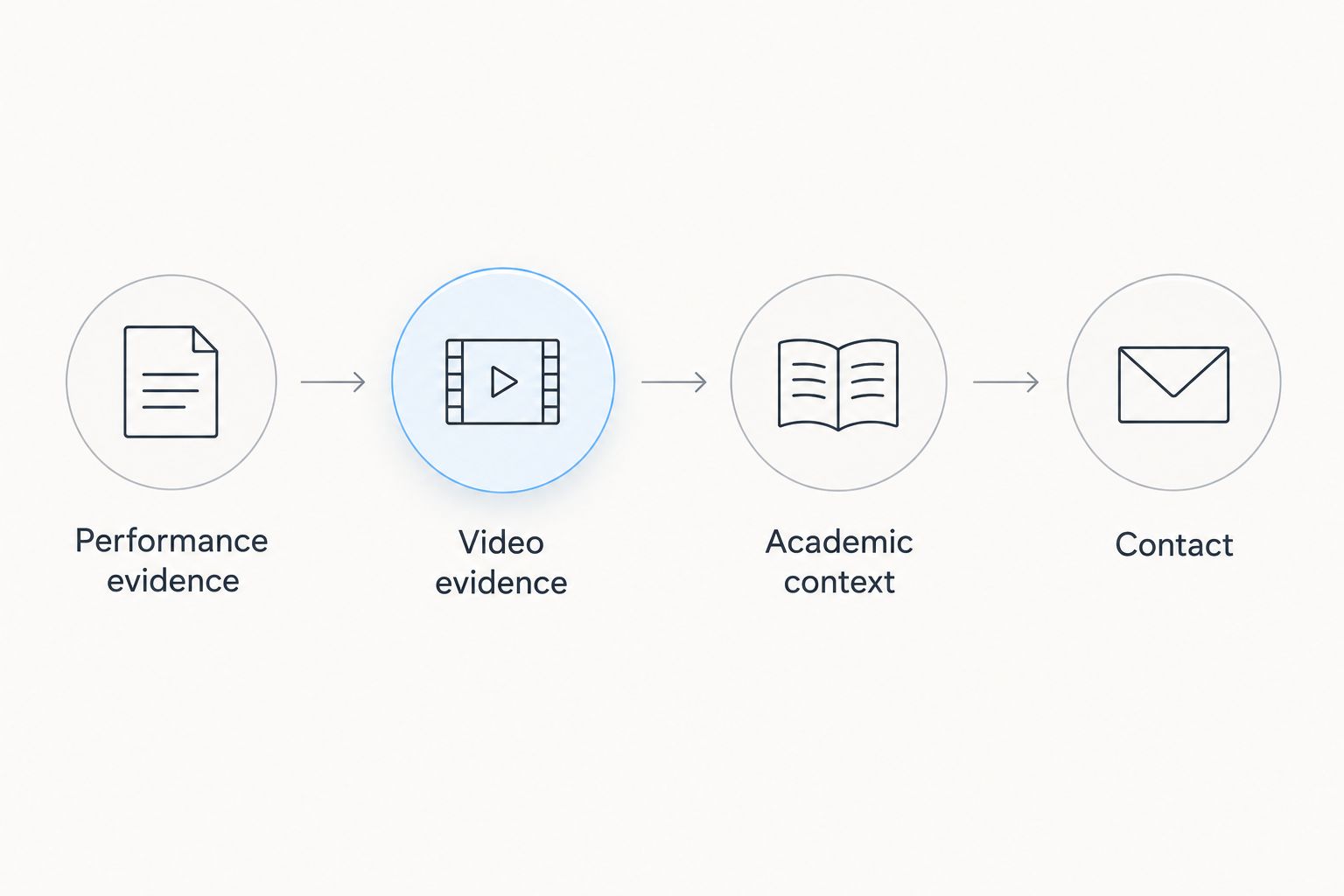
- Start with a 1-page summary as an editing limit, not a recruiting rule. Add your name, sport, event or position, relevant team or training affiliation, and intended recruiting purpose where those details are accurate.
- Add a section labeled Performance evidence. Select results from the verified inventory, keeping dates and competition context beside each claim.
- Add Video evidence. Begin with 3 clips as a manageable selection target, not a requirement; use fewer when fewer clips genuinely support the evaluation.
- Add Academic context only when relevant. State confirmed information plainly, and do not claim eligibility, admission, or scholarship qualification based on a profile or your own interpretation.
- End with Contact. Use a monitored contact route and identify the appropriate adult contact when the athlete is a minor.
Expected result: a reader can identify the athlete, understand the evidence, and find a next step without reconstructing the story from scattered posts.
For your 2026 summary, put the strongest relevant evidence before the longer biography. Your opening should explain what you compete in and what you want evaluated, not tell your entire sporting history.
The following sequence keeps supporting material attached to its purpose. Each stage should work before you move to the next.
Choose the sharing format
Use a short PDF for a fixed submission and a shared document for an actively maintained packet. Neither format fixes weak evidence or inaccessible video.
| Format | Best for | Advantage | Limitation |
|---|---|---|---|
| PDF packet | A dated submission or attachment | Preserves the submitted layout and version | An older attachment does not change when you revise the master |
| Shared document | A packet you update during recruiting conversations | Keeps revisions in one reader-facing location | Sharing permissions need testing, and edits can change what an earlier reader saw |
Choose the format the recipient requests. If no format is specified, choose the one you can maintain and test reliably; sending multiple versions without identifying the current one creates avoidable confusion.
Keep an editable master either way. A PDF is a delivery copy, not your only record of the work.
Video and delivery checks
Attach context to every clip
- Identify the athlete before asking the reader to interpret the footage. State the event, position, lane, jersey, or another accurate identifying detail when needed.
- Label the competition and recording date when known. Explain whether the footage shows a full performance, an extended passage, or selected highlights.
- Add a timestamp when the relevant action starts inside a longer recording. Describe what the reader should evaluate without claiming the clip proves more than it shows.
- Retain enough surrounding action to make the performance understandable. A finish without the race context or a scoring action without its preceding play answers only part of the question.
- Open every supporting item from the reader’s perspective. Check playback, identification, and permissions rather than stopping after the thumbnail loads.
Expected result: each clip has a clear subject, a defined context, and a working access route.
A highlight reel is useful for directing attention, but selected moments leave out other parts of performance. Full-event or extended footage supplies more context, but asks the reader to spend more time finding the relevant action. Use timestamps and concise descriptions to address that trade-off.
Do not add background music or decorative editing at the expense of identification. The portfolio’s job is to make the athlete easier to evaluate.
Prepare the submission
- Read the recipient’s submission instructions and follow the requested channel. Do not treat a general public contact route as permission to bypass a specified process.
- Write a 2-sentence introduction as a drafting constraint: identify yourself and the purpose of the message, then explain the evidence you are sharing.
- Check that the athlete name, event or position, and contact details match across the message and packet. Resolve contradictions before sending.
- Mark the packet with an update date and a clear version identifier. Keep the same identifier in your private submission log.
- Record the recipient, submission date, version sent, and any stated next step. Keep this log private.
Expected result: you know exactly what each recipient received and can answer a follow-up without guessing which document they opened.
Your 2026 submission log is an administrative record, not evidence of recruiting interest. Record an acknowledgment as an acknowledgment; do not relabel it as an offer, evaluation, or commitment.
Update the packet after a new result
A second workflow starts when a verified performance changes, rather than when you contact a new coach. Update the evidence first and the introduction second. That order prevents the headline from promising something the packet does not yet support.
- Add the new performance to the evidence inventory with its source, date, and competition context.
- Check whether it replaces an older entry, adds a distinct achievement, or belongs only in the longer record.
- Update the reader-facing summary and relevant video description. Remove superseded wording that would contradict the new entry.
- Test the revised packet, then record a new version and update date.
- Send a factual update to an existing contact only when it provides relevant new information or answers a request.
A 2026 result does not automatically erase an older achievement. Keep historical evidence when it remains relevant, but distinguish the date of the performance from the date you updated the document.
For an update message, state what changed and where the supporting evidence appears. Avoid resending an unchanged biography as though it were news.
Troubleshooting
The coach cannot open a video
Check whether the recording requires an account, an invitation, or access through the owner’s organization. Adjust permissions only where you have authority, or use another sharing method approved by the footage owner. Test again while signed out before resending.
The profile and original result disagree
Pause the disputed claim in the recruiting packet. Compare the competition, date, athlete identity, and result against the original record; request a correction through an available publisher contact route when appropriate. Do not quietly substitute the more impressive figure.
The PDF opens, but its links do not work
Test the exported file rather than the editable master. Check that supporting references survived the export and point to the intended destination, then replace the delivery copy. A successful export message is not a completed reader check.
The footage does not clearly identify the athlete
Add an accurate identifying note and a timestamp. If the recording still leaves identity uncertain, replace it or exclude it. Do not ask the recipient to infer which athlete you mean from a crowded frame.
Different coaches have different versions
Use your submission log to identify the version each coach received. Send a concise correction when a material fact changed, and clearly identify the replacement. Do not assume an updated shared document explains what changed to someone who read it earlier.
Customize your workflow
Build separate packet versions around genuine evaluation needs, not cosmetic changes. A position-specific introduction, an event-specific results selection, or a requested academic summary changes what a recipient can assess.
Turksathletes provides public athlete context; your private working record should preserve source details and submission history. Keep those functions separate so a public-facing change does not erase your record of what you previously sent.
For athletes competing across disciplines, keep one evidence inventory and select different entries for each packet. This reduces conflicting biographies while allowing the opening page to stay relevant.
Do not automate result claims merely because a number appears online. Review the source, identity, and competition context before moving a new entry into the reader-facing document.
FAQ
How do I turn a TCI Athletics profile into a recruiting portfolio?
Use the public profile as a reference, then build a separate packet containing verified results, relevant video, appropriate academic context, and contact details. Check every claim and test access before sharing it.
Can I send my public athlete profile instead of a portfolio?
You can share a public profile as an introduction, but it does not replace a recipient’s requested recruiting materials. A separate packet lets you select evidence for a particular event, position, or program.
What should I include if I do not have highlight footage?
Include verified results and clearly explain the evidence you do have. Add suitable footage when you can share it with permission; do not imply that unavailable footage has been reviewed.
Is a PDF better than a shared recruiting document?
A PDF is better for preserving a fixed submission, while a shared document is better for maintaining a current packet. Follow the recipient’s format requirements and test the delivery copy.
Should I put academic records in a public recruiting portfolio?
Keep sensitive academic records out of a broadly shareable portfolio. Provide relevant academic context in the summary and send detailed records through the appropriate private process when requested.
How do I update a coach after a new personal best?
Verify the performance, update the packet, and send a brief message identifying the new result and its evidence. Keep the competition date distinct from the document’s update date.
Does a recruiting portfolio establish scholarship eligibility?
No, a recruiting portfolio does not establish scholarship eligibility, admission, or selection. Confirm the applicable requirements with the program or governing organization responsible for the decision.
One last thing
Save the exact packet you sent, not just the latest master. A coach’s question can refer to an earlier result, description, or clip selection. Preserving the submitted version lets you explain changes accurately instead of trying to reconstruct the conversation from memory.